
Rant Online Casino Login, Verification and Registration Guide
If you are thinking about joining Rant Casino, this guide shows you exactly how to register, log in, verify your account, and keep everything secure, step by step. We will also highlight the big advantages of playing at a licensed, bonus-packed casino like Rant so you know exactly what you are signing up for.
Getting Started with Rant Casino
At RantCasino, you create one account and use it for everything: slots, live casino, tournaments, cashback, VIP, and withdrawals. You can start on desktop and continue from your phone with the same Rant Casino login details, balance, and bonuses, no extra profiles or apps needed.
Right after you log in to Rant Casino, you get:
- A clean lobby with Popular, New, Slots, Megaways, Jackpots, High Volatility, Bonus Buys, Table Games, and Live Casino categories.
- Quick links to the Welcome Offer, Wacky Free Spins Wednesdays, weekly cashback, and RANTers Quests missions.
- Instant access to Payments, Promotions, Support, Responsible Gaming, and your Profile from the top header or mobile menu.
The big advantage here is simplicity; everything that matters for a real player is always one or two clicks away, so you do not waste time digging through complicated menus.
How to Register at Rant Casino
The faster you register at Rant Casino, the faster you can grab the 100 percent Welcome Offer up to €1,000 and start earning Reward Points for cashback. The registration flow is split into short steps to keep it friendly on both desktop and mobile.
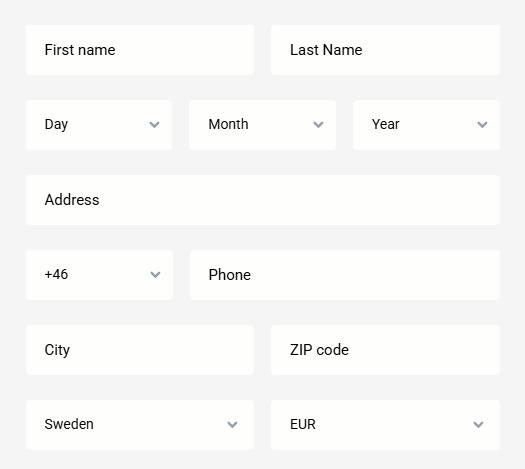
Step-by-Step Registration Process
Here is how the full signup looks from start to finish:
- Click “Join Now” or “Create Account” in the header or mobile menu.
- On Step 1, pick your Clan and create Rant Casino login details:
- Choose a unique username.
- Enter a valid email address.
- Create a strong password that meets minimum length and character rules.
- Add your mobile phone number.
- On Step 2, fill in personal information:
- First and last name exactly as in your documents.
- Address, city, ZIP/postal code, and country of residence.
- Date of birth and gender.
- Select your account currency (for most players, this will be euros).
- Tick the checkboxes to confirm you are of legal gambling age and that you accept the Terms and Conditions and Privacy Policy.
- Optionally, enter a promo or bonus code if you have one, or leave it empty and just use the default welcome offer later in the cashier.
- Click “Sign Up” or “Continue” to complete the registration.
Right after this, you will see a “Congratulations” pop-up saying you have successfully registered at RANT and that we have sent a confirmation email to activate your account. The flow is intentionally short so you can complete it in 2–3 minutes and move straight into claiming bonuses.
Email Verification and Account Activation
To fully activate your RantCasino account, you need to verify your email. We send an activation link right after Rant Casino registration, and the pop-up reminds you to check your inbox and your junk or spam folder.
Once you click the link:
- You are taken to a confirmation page saying “Success! Your account is activated”.
- Your status changes from “unactivated” or “pending activation” to fully active.
- You can now log in normally and access the Rant Casino cashier, bonuses, and all games.
If you try to log in to Rant Casino before activating, you may see messages like “Account is unactivated” or “Account pending activation”, which is just a reminder to use the email link. The activation step protects your account from typos and keeps bonus abuse down, which in turn helps us keep promotions generous for real players.
Choosing Your Currency and Preferences
During Rant Casino registration, you pick a currency in the dropdown, and most users go with euros so that all deposits, withdrawals, and bonuses show as EUR. This choice affects minimum deposits, bonus amounts, and things like tournament prizes, so it is worth picking the one you actually use.
You will also see a checkbox about promotional emails and offers. If you leave marketing enabled, you will get alerts about Wacky Free Spins Wednesdays, RANTers Quests, cashback boosts, and seasonal campaigns like Santa Palooza or Winter Wrap Up, which often mean more free spins and reloads for the same play.
Rant Casino Login Process
Logging into RantCasino is fast and familiar; there is no extra login for mobile or any separate launcher.
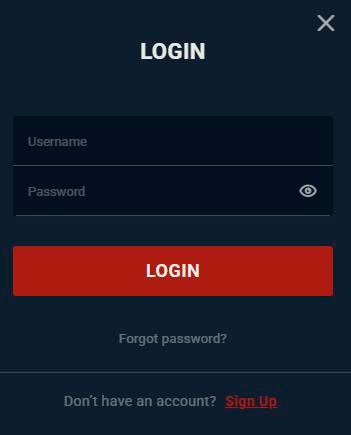
Desktop Login Instructions
On desktop:
- Go to rantcasino.com in your browser.
- Click the “Login” button in the header.
- Enter your username and password.
- Hit “Login,” and you will be redirected to the lobby.
If you do not yet have an account, there is a visible link “Don’t have an account? Click here to create one” right under the login fields. If you forgot your details, a “Forgot password” link sends you to the recovery page.
The system also gives clear feedback messages if something is wrong, such as “Invalid username or password”, “Missing password”, or “Account is frozen”, so you know whether to correct details, activate your email, or contact support.
Mobile Browser Login
On mobile, you use the exact same RantCasino login but with a mobile-optimised layout.
- Open rantcasino.com on your phone or tablet.
- Tap the menu icon and select “Login”, or use the bottom bar login where available.
- Type your RantCasino username and password and tap the login button.
You can also switch language before logging in to RantCasino using the small language dropdown at the top, which is handy if English is not your first language. The big advantage here is that you never have to download a separate app; you get full account access directly in your browser.
Account Verification and KYC Requirements
To stay licensed and protect both you and us, Rant Casino follows the Know Your Customer rules of verification. That means at some point, usually before your first bigger withdrawal, we will need to verify that you are who you say you are.
Identity Verification Documents
In your profile, you will see a KYC status section with a “Verify KYC documents” prompt when Rant Casino verification is needed. The KYC tooltip explains that this process is about customer identification, regulatory compliance, and account security.
We may ask you to upload clear photos or scans of:
- Passport.
- National ID card.
- Driving licence.
- In some cases, an additional document like a tax ID, a resident card, or similar.
Until the documents are received and approved, certain actions, such as higher withdrawals, can be locked, and you may see messages like “Awaiting KYC verification” in the cashier. Once your KYC is validated, your status shows as verified, and your withdrawal flow becomes much smoother.
The upside for you is that a fully verified account is better protected against someone trying to hijack your profile or cash out your balance.
Address and Payment Method Verification
Besides identity, we sometimes need proof of address and payment ownership. You might be asked to upload:
- A recent utility bill, bank statement, or government letter with your name and address.
- A screenshot or statement showing you own the card, bank account, or wallet used to deposit.
The cashier and support messages clearly indicate when a withdrawal is “Awaiting withdrawal approval” or “Awaiting KYC input”, which usually just means we are finishing checks. As soon as everything matches, payouts go through, and future withdrawals are normally much quicker.
Account Security and Password Management
RantCasino puts a lot of effort into security so that your experience stays fun and your data stays private.
Password Recovery Options
If you ever forget your Rant Casino password, it is easy to reset.
- Click “Forgot password” on the login screen or open the “Recovery” page.
- Enter your username or the email you used for registration.
- We sent a password reset link to your email.
- Follow the link, set a new password twice, and confirm.
The Rant Casino reset form checks that your new password meets minimum rules and that the two entries match. If the link expired, you see a message like “Password change link expired! Please request a new one”, and you can simply request another email.
There is also a “Change Password” option inside your Rant Casino profile for when you are logged in and just want to update it for safety.
SSL Encryption and Data Protection
RantCasino uses HTTPS and SSL encryption, so all communication between your browser and our servers is protected. The Privacy Policy and Security pages describe how your data is stored and processed under strict standards.
We also use tools like Google reCAPTCHA on some forms, which helps block bots and automated attacks on Rant Casino registration and login. For sensitive changes such as email updates, you receive activation links so nobody can switch your contact details without confirming.
All of this means you get a modern, secure environment that feels like a serious licensed casino, not a shady site held together with duct tape.
Troubleshooting Login Issues
If something goes wrong during login, the platform is quite good at telling you what exactly happened.
Common messages and what to do:
- “Invalid username or password.” Check spelling, language layout, and caps lock, then try again.
- “Missing username” or “Missing password”; one of the fields is empty.
- “Account is unactivated” or “Pending activation”, open your email and click the activation link.
- “Account is frozen” or “Account is deactivated”, you or support applied a freeze or deactivation, contact Customer Support to discuss reopening.
- “Login from this country is restricted.” Your current location is not allowed under our license.
- “System Error” or “Error Socket timeout”, likely a temporary tech issue, so retry in a few minutes, refresh, or try another browser or device.
When you cannot solve it yourself, the Support page offers a contact form and Live Chat where you can describe the problem, attach a screenshot, and get help from the team. That support presence is another advantage compared to many unlicensed sites that are practically impossible to reach when something goes wrong.

Frequently Asked Questions
You can usually complete Rant Casino registration in 2–3 minutes, activate your email right away, and be ready to deposit, claim the 100 percent up to €1,000 Welcome Offer, and start playing in your first session.
You can normally deposit and play immediately after registration, but Rant Casino may ask for KYC verification documents before or during your first withdrawals, especially if you cash out higher amounts or trigger internal checks.
Check your junk or spam folder and use the “Didn’t receive email yet?” option on the site to resend, and if that still does not help, contact Support so they can confirm your email address and assist.
Yes, you use a single username and password on all devices, and your balance, bonuses, and KYC status stay synced whether you log in from a desktop or a mobile browser.
RantCasino runs on HTTPS with SSL encryption, uses reCAPTCHA, and has separate Security and Privacy Policy pages that describe how your data is protected, plus all changes to key details like email require confirmation links.